
News
Google Maps adds Ask Maps and a 3D navigation view to Android and iPhone
Google is adding a conversational search tool and a redesigned navigation experience to Maps, combining Gemini with live mapping data to make planning and driving more useful on smartphones.
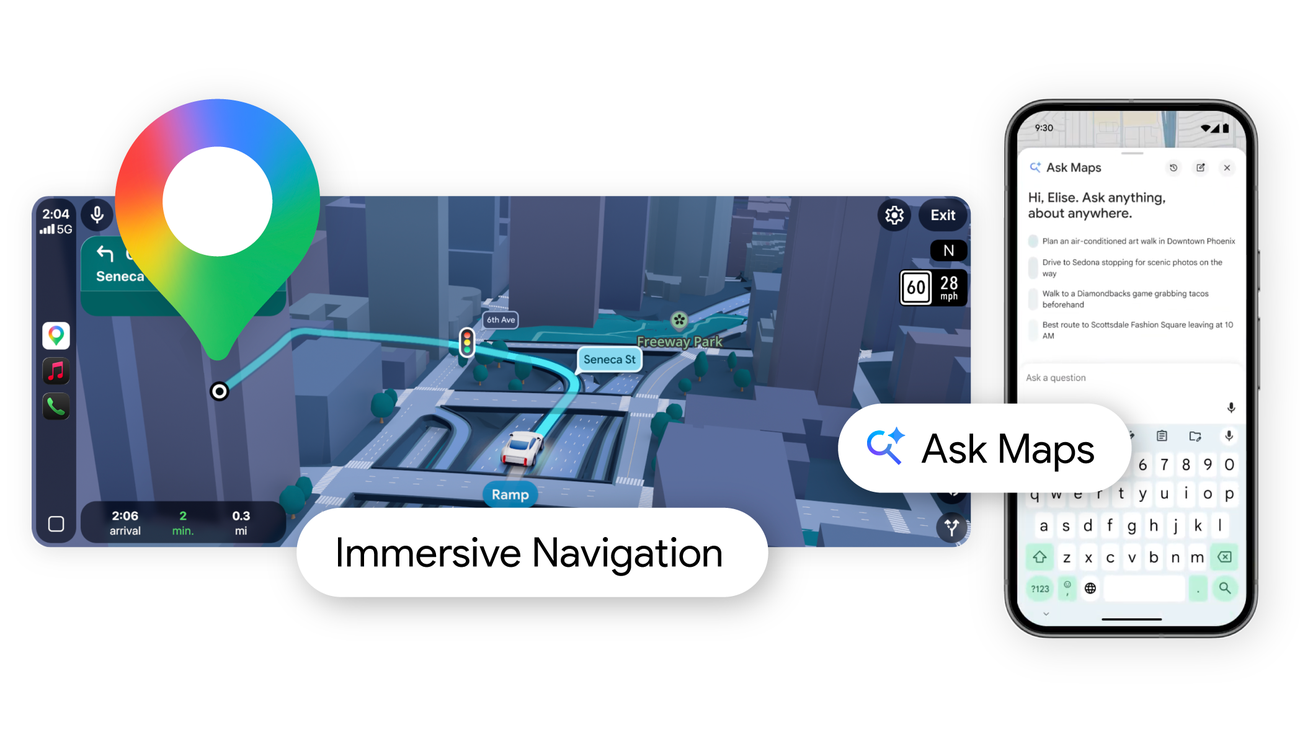
Google Maps is becoming more than a tool for finding an address. The company has announced two major mobile features powered by Gemini: Ask Maps, a conversational way to explore places, and Immersive Navigation, a redesigned driving view that adds more visual context to the road ahead.
The announcement is relevant to both Android and iPhone users because Ask Maps is rolling out on both platforms in the United States and India. Google says desktop support is coming later, while Immersive Navigation will expand to eligible Android and iOS devices, CarPlay, Android Auto and cars with Google built-in.
Ask Maps turns a search into a conversation
Traditional Maps searches usually begin with a name, address or category. Ask Maps is designed for more open-ended questions. Google gives examples such as finding a place to charge a dying phone without waiting in a coffee shop, or locating an illuminated public tennis court for an evening game.
Instead of returning a simple list, Ask Maps uses a conversational interface and a customized map to present possible answers. Google says the feature can draw on information from more than 300 million places and contributions from more than 500 million people. That includes reviews and local knowledge, giving the system more context than a basic keyword search.
The results can also be personalized. Google says Ask Maps may use places a person has searched for or saved to make recommendations more relevant. Someone looking for a restaurant, for example, could receive suggestions based on previous preferences and the location of friends who are meeting up. This personalization is useful, but it also makes Maps more dependent on the quality of the account data and the assumptions behind the recommendation.
Once a destination has been selected, Google says users can save it to a list, share it with friends, get directions or book a restaurant reservation from the same flow. That is a significant shift in emphasis: Maps is not only answering where to go, but also helping turn a plan into an action without switching between several apps.
Google’s official announcement says Ask Maps began rolling out on Android and iOS in the United States and India, with broader availability to follow. The company has not presented the feature as a universal replacement for ordinary search, and availability may still depend on country, language, device and account settings.
Immersive Navigation adds more detail to the drive
The second part of the announcement focuses on driving. Immersive Navigation uses a more detailed 3D view to represent buildings, overpasses and terrain along a route. Google says Maps can highlight lanes, crosswalks, traffic lights and stop signs when those details are useful for an upcoming manoeuvre.
The redesign is intended to help drivers prepare earlier. A wider view of the route, smart zoom and transparent buildings are designed to make complex turns and lane changes easier to anticipate. Google is also updating voice guidance so instructions can sound more natural and provide additional context, such as explaining which exit to pass before taking the next one.
Maps will also explain trade-offs between alternative routes. A faster route may include a toll, while a slower route may avoid congestion. Google says the app incorporates more than five million traffic updates around the world every second, while its community of drivers provides more than 10 million reports about disruptions such as crashes and roadworks each day.
The final part of the navigation update concerns the arrival itself. Before a trip, Maps can preview the destination and surrounding Street View imagery. As the driver approaches, Google says the app can highlight nearby parking, the building entrance and which side of the street to use. These details address a common weakness in turn-by-turn navigation: reaching the correct address does not always mean finding the correct entrance.
What the announcement means for smartphone users
Ask Maps and Immersive Navigation show Google trying to connect three layers of mobile software: search, artificial intelligence and location services. The phone is no longer just displaying a map. It is interpreting a question, combining information from different sources and presenting a route or recommendation that is intended to fit the user’s situation.
That approach could save time when a request is difficult to phrase as a conventional search. It may also make Maps more useful while travelling, when a person needs a quick answer about charging, parking, food or a stop along a route. At the same time, conversational results require users to check important details before relying on them. Reviews can change, local information can be incomplete and an AI-generated recommendation is not a guarantee that a venue is open, accessible or suitable.
Google describes the features as rolling out rather than universally available. Users who do not see Ask Maps or the new navigation view should not assume that their phone is incompatible; the company’s announcement indicates that availability will expand over time and vary by market. The practical impact will therefore depend as much on rollout coverage as on the underlying Gemini technology.
For now, the announcement marks a clear change in direction for Google Maps. The app is moving toward a more conversational planning experience and a more visually detailed driving interface, while keeping familiar actions such as directions, route comparison, parking information and place sharing at the centre of the mobile experience.