
News
Google Updates Agentic Calling on Search: How the U.S. Feature Works
Google’s updated guide explains how its U.S. agentic calling feature contacts local stores to check product availability and summarize the answers for shoppers.
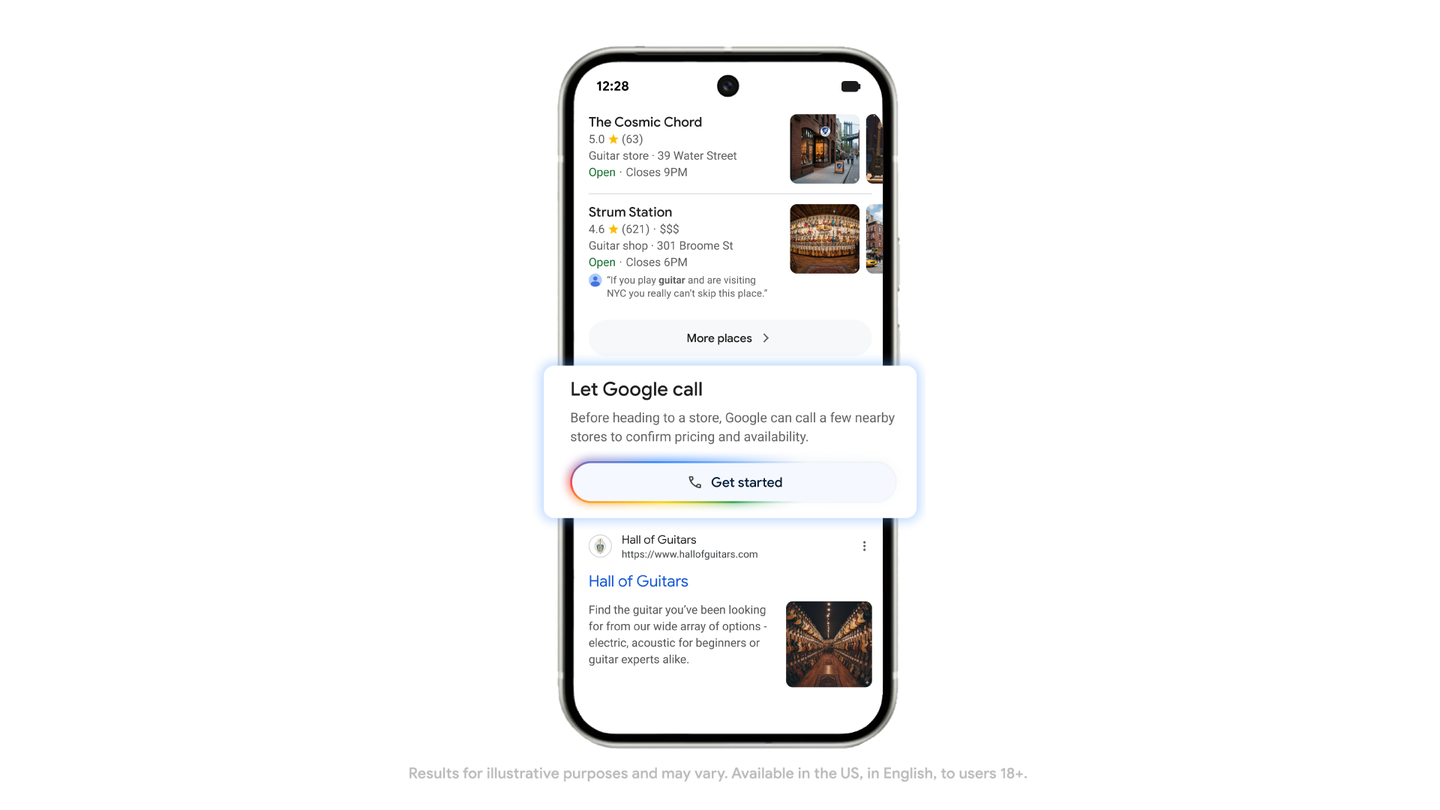
Google has refreshed its official guide to agentic calling, a Search feature that can contact local businesses on a user’s behalf. The update, published on July 24, explains how shoppers in the United States can ask Google to check whether nearby stores have a product in stock, then receive the results by text message or email.
The feature is aimed at a familiar mobile nuisance: finding a product locally often means opening several store pages, checking inconsistent inventory information and making multiple calls. Google’s system is designed to handle the initial availability check while the user stays in Search or AI Mode. It is especially relevant for time-sensitive purchases such as electronics, although Google’s guide also lists toys, health and beauty products.
Google first introduced the capability in November 2025 as part of its wider push to make Search more useful for shopping. The updated Google guide confirms that the feature remains focused on the U.S. and does not promise worldwide availability. Users in other markets should therefore avoid assuming that the option will appear in their local Search results.
How the calling workflow works
The process starts with a normal product search. On a phone, search for the item in Google and add wording such as “near me” or “nearby.” The query should describe the product clearly enough for Google to identify the relevant category and local stores. For example, a shopper might search for a specific type of phone accessory or an electronic device followed by “near me.”
Open Google Search or AI Mode and search for the product with “near me” or “nearby.”
Scroll through the results and look for the option to have Google confirm whether the item is in stock nearby.
Tap the option to get started and answer the short, product-specific questions Google presents.
Choose whether the summary should arrive by text message, email or both.
Review the completed summary when Google finishes contacting relevant local businesses.
The questions are intended to narrow down what the shopper actually wants before any calls take place. Depending on the product, that may include details such as the model, size or other characteristics. This step matters because a vague request can produce an answer about a similar item rather than the exact product the shopper needs.
What the feature can and cannot confirm
Agentic calling is best understood as a first-pass research tool. Google says it can gather information about local availability, pricing and possible promotions, then combine the responses with local inventory information from its Shopping Graph. That can save time, but it does not turn a store’s inventory system into a live guarantee.
Stock can change between the call and the shopper’s arrival. A store employee may also describe a product differently from the way it appears online, or quote a price that depends on membership, location or current terms. The summary should therefore be treated as a shortlist of useful leads. Before travelling to a store, users should confirm the exact model, final price, return policy and pickup conditions directly with the retailer.
The workflow described by Google is designed to collect information rather than complete a purchase. It returns answers through the selected communication channel, so users remain responsible for deciding whether the information is accurate and whether to buy. The feature should not be confused with separate shopping tools that may involve price tracking or checkout.
Safety and privacy precautions
Because an automated system is making real calls, users should keep the request narrowly focused. Do not include payment-card details, passwords, identity documents, account recovery codes or other sensitive information in the search query or in the answers to Google’s setup questions. Product details are usually enough to identify what a store needs to check.
It is also worth checking the businesses Google proposes before starting. Prefer established retailers with a verifiable website, phone number and physical location. If the summary contains an unusual offer, a request for payment before collection or a link asking for account credentials, stop and contact the retailer through its independently verified website or official customer-service channel.
Users should also make sure the chosen email address or phone number is correct, particularly when shopping for a high-value device. A text or email summary can contain useful information, but it should not be treated as proof that a transaction has been placed or that an item is reserved. The safest workflow is to use Google’s call as a screening step, then confirm the final details yourself.
Why this matters for mobile search
Agentic calling shows how mobile Search is moving from displaying links toward coordinating small tasks across the web and traditional phone networks. For shoppers, the immediate benefit is convenience: a phone can turn a product query into a structured local stock check without requiring the user to stay on hold.
The limitation is equally important. The quality of the result depends on the U.S. rollout, the stores Google can identify, the accuracy of each retailer’s answer and how quickly inventory changes. For now, the feature is most useful when the user has a clear product requirement, several nearby stores and enough flexibility to verify the result before making the trip.