
Noticia
Gemini Spark Comes to Chrome With Auto Browse
Google is integrating Gemini Spark directly with Chrome so its AI agent can handle selected web errands, while expanding access for Google AI Pro subscribers in more than 160 additional countries.
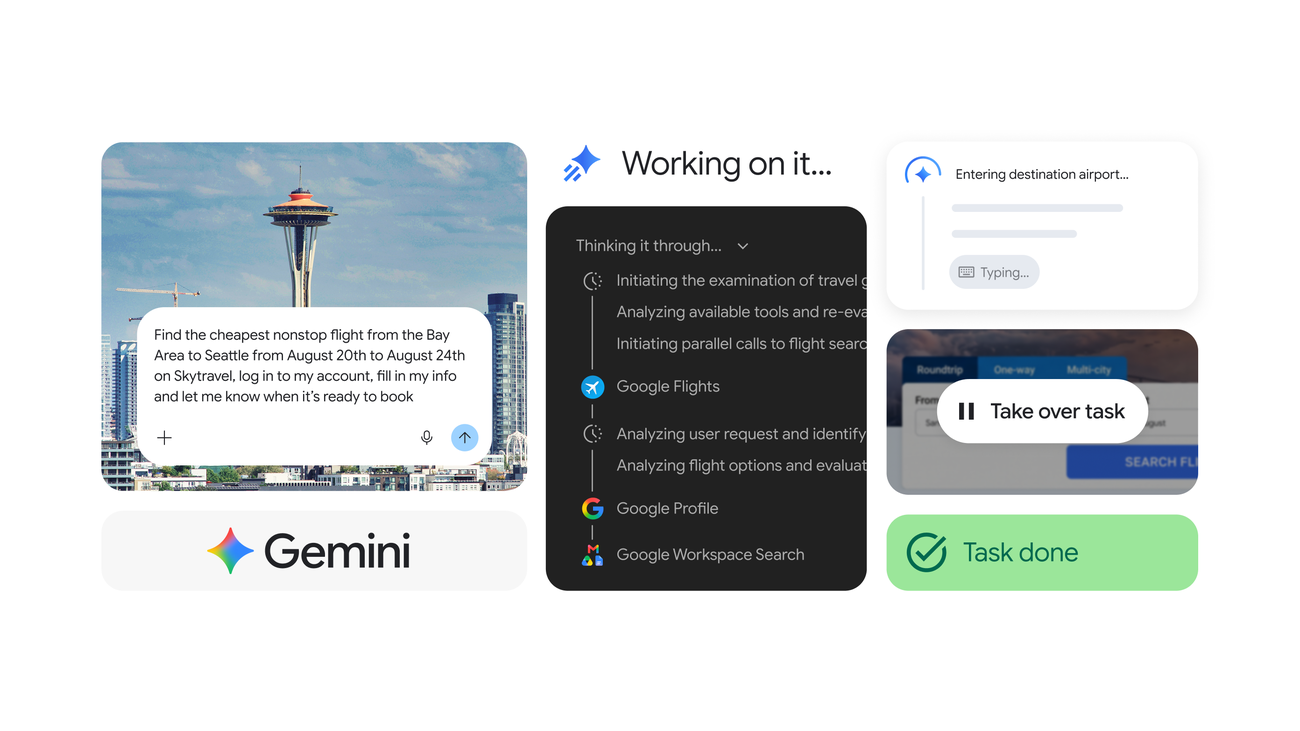
Google is pushing its Gemini app further into everyday browsing. In an official announcement dated July 30, 2026, the company said Gemini Spark now integrates with Chrome, giving the agent a way to handle selected web tasks while using the user’s existing browser context.
The update is significant because Spark is designed to do more than answer questions. With the user’s permission, it can work through multi-step errands, use logged-in accounts and saved passwords, and return control when an action becomes sensitive. Google is also expanding Spark access for Google AI Pro subscribers in more than 160 additional countries, although the new Chrome browsing capabilities initially roll out in the United States.
From answering questions to completing errands
Traditional assistants generally stop after presenting information or suggesting a link. Spark is designed around a different model: the user describes an objective, and the agent attempts to move that task forward. Google’s examples include scheduling viewings for saved apartments, researching flight options and starting a booking process.
That distinction matters on mobile and desktop alike. A search result can identify a flight or property, but the user still has to open several pages, compare details and repeat information across forms. Chrome auto browse is intended to reduce that manual work by allowing Spark to navigate relevant pages and use information already available through the user’s signed-in accounts.
Google has not presented the feature as an unrestricted autopilot. The company says the agent operates with permission and keeps the user involved in sensitive actions such as payments. In those situations, the task is handed back to the person rather than completed automatically. The design reflects a practical limit for consumer AI: convenience is useful only if the user can see where the agent is going and intervene before a consequential step.
Security is part of the rollout
Browser-based agents face a different security problem from ordinary chatbots because web pages contain instructions, forms and content that the agent must interpret. A malicious page could attempt to influence the model into ignoring the user’s goal, exposing information or taking an unwanted action. Google calls this threat prompt injection and says Chrome’s agentic features include protections against it.
Google’s separate security explanation for agentic capabilities in Chrome describes a layered approach. The company says Chrome can limit which website origins an agent is allowed to read or modify, check proposed actions with a separate alignment system and scan pages for indirect prompt injection. The design also includes confirmations before certain sensitive actions, including financial activity, sign-ins and other consequential operations.
These safeguards do not make an agent infallible. They are intended to narrow the ways a hostile page or misleading instruction can redirect the task. Users still need to read the browser state, verify destinations and take over when a payment, message or account change is involved. That is especially important when Spark is allowed to interact with services that contain personal data or saved credentials.
A wider rollout, but not universal availability
The July announcement separates two parts of the expansion. Google AI Pro subscribers in more than 160 additional countries are beginning to receive access to Spark. The Chrome auto-browse capability, however, is initially limited to the United States, with Google saying that additional regions are planned for the future.
That distinction is easy to miss in a feature announcement. Having access to Spark does not necessarily mean that every Chrome action is available in every country, account type or service. Eligibility can depend on the subscription, the market, the connected website and the type of task. Users should therefore treat the rollout as a staged expansion rather than a global switch being turned on at once.
The feature also depends on trust between the user, Google, Chrome and the websites involved. Logged-in accounts and saved passwords make automation more convenient, but they increase the importance of clear permissions and visible confirmation steps. Google’s announcement says Spark can use this information with the user’s permission; it does not remove the responsibility to check what is being accessed or changed.
Why the update matters for mobile apps
Gemini Spark’s Chrome integration is primarily a browser feature, but it fits a wider shift in smartphone software. Mobile users increasingly move between search, messaging, shopping, travel and productivity apps to complete one task. An agent that can understand the goal across those steps could make the phone feel less like a collection of separate applications and more like a coordination layer.
The trade-off is control. A conventional app exposes its actions through familiar screens and buttons. An agent compresses several actions into a single instruction, which can save time but make mistakes harder to notice. Google’s decision to pause for sensitive steps acknowledges that the most important part of agentic software may not be how much it can do alone, but how clearly it shows what it plans to do next.
For now, Gemini Spark’s Chrome integration is best understood as an early, geographically limited step toward that model. Google is expanding access and testing more complex workflows, while keeping payments and other high-impact actions in the user’s hands. If the rollout reaches more regions, the quality of those controls will matter as much as the convenience of automated browsing.