
Actualité
Samsung Galaxy S26 Super Steady Adds Horizon Lock for Action Video
Samsung says a new horizontal-lock option for Super Steady video can keep Galaxy S26 footage level through movements of up to 360 degrees.
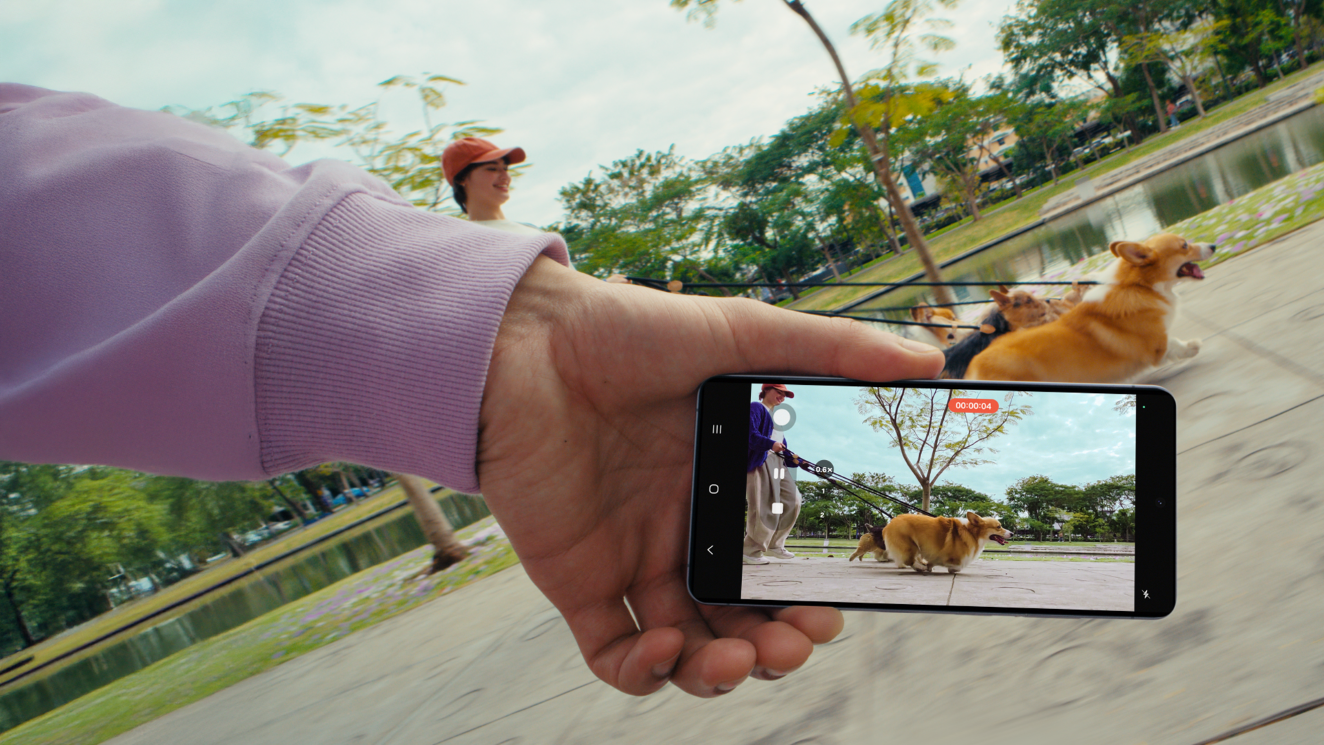
Samsung has detailed a camera update for the Galaxy S26 series that targets one of the most common problems in smartphone video: a horizon that tilts as the person filming moves. The company’s July 10 newsroom announcement describes a new horizontal-lock option inside Super Steady video, designed to keep footage level while the phone is rotated or carried through fast movement.
By Amelia Santos
Super Steady is Samsung’s enhanced video-stabilisation mode. The new option adds a separate job to that system: maintaining a consistent horizon. Samsung says the phone uses its gyroscope and accelerometer to calculate the direction of gravity in real time, then corrects the frame as the device moves. The company says the correction can work through rotations of up to 360 degrees.
What Samsung is announcing
The announcement is about software-assisted capture rather than a new external accessory. Samsung presents horizontal lock as a way to obtain a level image without carrying a gimbal or stabiliser. That distinction matters: the feature is intended to reduce distracting tilts during recording, while the phone’s normal stabilisation system continues to address movement in the shot.
Samsung highlights running, cycling and skateboarding as examples of situations where the feature may be useful. It also describes a more unusual scenario: the camera can continue to keep the frame level even when the phone is turned completely upside down. For people recording short clips while walking, moving around an event or following a subject, the practical benefit is a steadier visual reference from one frame to the next.
The company says Super Steady was first introduced on Galaxy phones in 2019. On the Galaxy S26 series, horizontal lock extends that idea by focusing on the orientation of the image, not only on reducing visible shake. Samsung’s announcement does not provide independent measurements of stabilisation performance, nor does it claim that every movement or lighting condition will produce identical results.
How to enable horizontal lock
Open the Camera app.
Switch to Video mode.
Tap the Super Steady Video icon.
Select Super Steady with horizontal lock.
Start recording.
The controls are deliberately simple, but the shooting conditions still matter. Samsung’s own note says Super Steady results can vary depending on the editing method and shooting conditions. A level horizon therefore should not be confused with a guarantee that every subject will look perfectly smooth: rapid motion, low light, obstacles and heavy cropping can still affect the final clip.
Why the feature matters for smartphone users
Smartphones have made action video easier to capture, but they have not removed the physical limitations of filming with a small handheld device. A person following a cyclist, documenting a hike or recording a moving performance may naturally rotate their wrist while trying to keep the subject in frame. Even when the subject remains visible, that rotation can make the finished video feel unsettled.
Horizontal lock addresses that specific problem at the moment of capture. It can be helpful for clips that will be shared directly, because the footage begins with a more consistent orientation before any editing takes place. It may also simplify later editing: a creator who wants to cut together several moving shots has less horizon correction to perform if the source footage was recorded level.
There are sensible limits. Users should not film while driving, crossing traffic or taking part in an activity that requires both hands and full attention. When recording on a bicycle, skateboard or similar equipment, the phone should be secured safely and the filming setup should not interfere with control of the activity. The feature can correct the image, but it cannot prevent a dropped phone or make an unsafe filming position safe.
A narrower promise than a full camera test
Samsung also mentions other Galaxy S26 camera features in the same announcement, including Enhanced Nightography video and support for the APV professional video codec on the Galaxy S26 Ultra. Those details provide context for Samsung’s broader focus on mobile video, but they are separate from the horizontal-lock update.
What the announcement confirms is straightforward: Galaxy S26 users can select a Super Steady option that uses motion sensors to keep the horizon level during recording, with Samsung describing correction through a full rotation. It does not establish how the feature compares with a physical gimbal, how much of the image is cropped, or how it performs across every Galaxy S26 model and shooting condition. Those questions require controlled, independent testing.
For now, the update is best understood as a targeted quality-of-life feature for action clips. Its value is not that it replaces every stabilisation tool, but that it tackles one highly visible problem directly from the phone’s Camera app.