
Actualité
Google’s Android update makes apps easier to find and calls more personal
Google is expanding Android with live location sharing, app preview videos, custom Calling Cards and new family-friendly experiences for Android Auto.
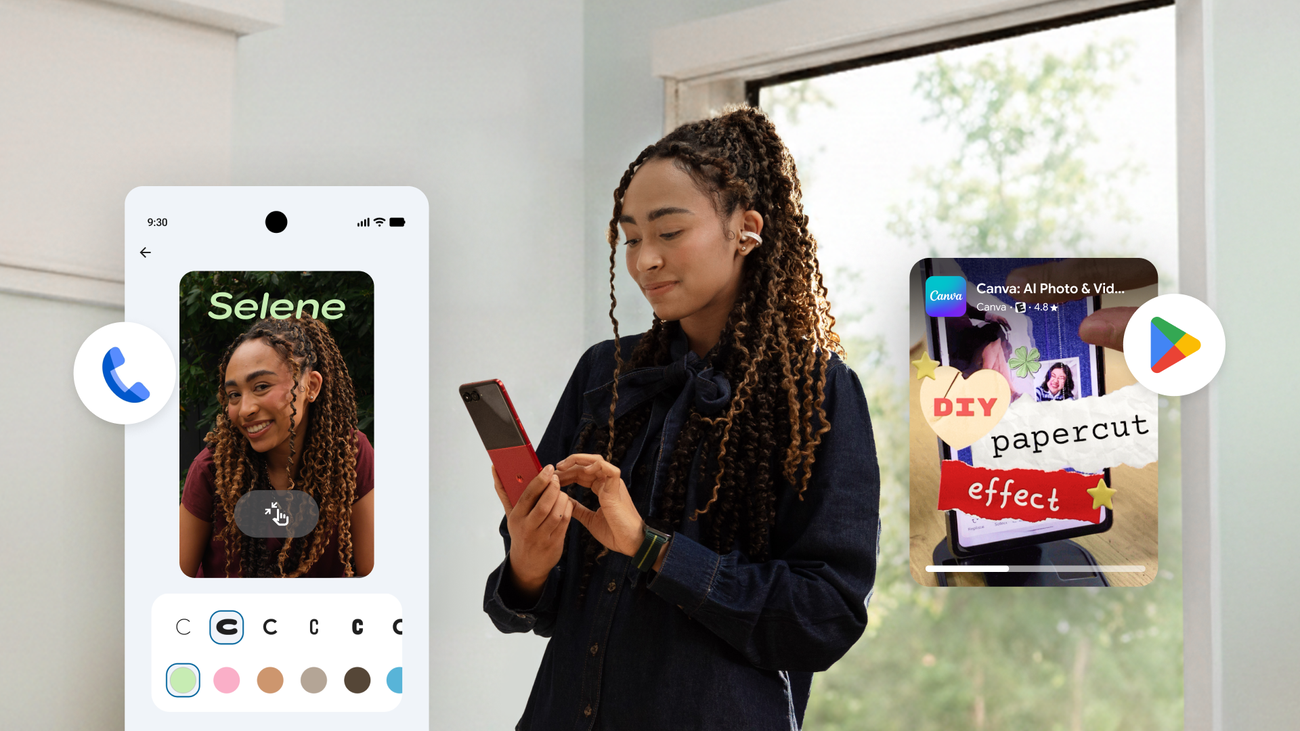
Google’s latest Android update connects several everyday tasks that usually live in separate parts of a phone. Through new features in Google Messages, Find Hub and Google Play, users can share their location, recover lost luggage, preview apps and personalize how their calls appear to other people. The announcement is detailed in Google’s official Android update.
The release is less about a sweeping visual redesign than about reducing friction between communication, discovery and practical mobile services. A location can now be shared from inside a conversation, an app can be previewed before installation, and a caller ID can carry more personality than a phone number alone.
Live location sharing moves into Google Messages
The most immediately useful change is the integration of Find Hub with Google Messages. Users can share their real-time location directly inside a conversation and see the other person on a live map. The feature is designed for situations such as meeting at an event, coordinating an airport pickup or letting someone know where to find you without switching to another application.
Google says the duration of sharing remains under the user’s control. Location sharing can be stopped whenever it is no longer needed, which is important for people who only want to provide temporary visibility rather than maintain an open-ended connection. Keeping the action inside the chat also makes the context clearer: the location is shared with the participants of that conversation instead of being treated as a separate public post.
Find Hub adds a route for lost luggage
The same update extends Find Hub beyond personal location sharing. If a user has attached a compatible tracker tag to luggage, Google says they can share a location link with a participating airline. Airline staff can then use the link to help locate the bag and provide updates.
This is a practical use of a tracker rather than a new tracking network. The user decides when to share the link and when to stop sharing it, so the feature can be used during a specific recovery process without creating a permanent handoff of location information. Google’s announcement does not claim universal airline support, which means travelers should still check whether their carrier participates before relying on the option.
Google Play Shorts bring app previews into the store
App discovery is also changing inside Google Play. Google says Play Shorts will soon let people browse a vertical feed of short videos showing apps in action. The examples named in the announcement include wellness, photography, shopping and webtoon applications.
The idea is straightforward: users can see how an app looks and works before tapping the download button. That could make discovery more informative than relying only on screenshots, descriptions or star ratings. It may also help smaller apps communicate their value quickly, especially when their main appeal is an interaction or workflow that is difficult to explain in a static listing.
There is an important qualification. Google describes Play Shorts as coming soon rather than providing a universal release date or promising availability on every device and account. Users should therefore treat the feature as a staged rollout, not as a setting that must already be present in every version of Google Play.
Calling Cards add a personal layer to incoming calls
Android is also introducing custom Calling Cards. Users can choose a photo, font and color, then decide whether the card should be shared with everyone or only with saved contacts. Google says the card can be edited or removed later.
This makes the incoming-call experience more recognizable without requiring a separate social profile. A familiar image or color treatment can help distinguish a call from a contact, while the sharing controls give users a way to limit the feature to people they already know. The choice to edit or remove a card is equally important because caller identification preferences can change over time.
New options for families and everyday communication
For Android Auto, Google highlights a selection of Teacher Approved games and apps aimed at children aged 3 to 12. The announcement frames these experiences for parked time, not as entertainment while a vehicle is moving. Examples include Disney Coloring World, LetraKid: Writing ABC for Kids and Marvel HQ: Kids Super Hero Fun.
That distinction should remain clear in any real-world use. A driver should not interact with games or other distracting content while driving, and families should follow the vehicle manufacturer’s controls and local road-safety rules. The feature is best understood as an option for waiting in a parked car, not as a reason to use a phone or dashboard display during a journey.
Google is also adding new Emoji Kitchen combinations for Gboard, including mixes built around cheese, roses, musical instruments and skunks. The feature is lighter than the communication changes elsewhere in the update, but it follows the same direction: Android is adding more ways to make routine exchanges feel personal without requiring a separate app.
What users should expect
Taken together, the update shows Google focusing on small transitions in the mobile experience. Messages becomes a place to coordinate live movement, Find Hub becomes more useful during travel problems, Google Play gives apps a more visual storefront, and calls gain a customizable identity layer.
Availability is not identical across the feature set. Some functions are presented as available in the update, while Play Shorts is described as coming soon and airline luggage support depends on participating carriers. Device support, account configuration and regional rollout may also affect what appears in a user’s apps. Checking the relevant Google app updates and permissions is therefore more reliable than assuming every feature arrives at once.